Every year, a portion of JAMB candidates walk into the exam hall well-prepared on content but unprepared for the format itself, and it costs them more marks than most people expect. The shift to computer-based testing wasn’t just a change in how answers get recorded — it changed the pacing, the interface habits candidates need, and even how mistakes get made compared to the old paper format.
Understanding What CBT Actually Involves
Cbt for jamb means the entire exam is taken on a computer at a designated center, with questions displayed on screen one at a time or in small groups, answered by mouse click or keyboard input rather than shading a paper answer sheet. Candidates are assigned a system, given login credentials, and work through a fixed time window with a visible countdown displayed throughout the session.
This setup introduces a few mechanical realities that paper exams never required: navigating between questions on screen, flagging questions to revisit later using on-screen tools rather than physically marking a paper, and managing time against a digital clock that’s constantly visible rather than checked periodically against a wristwatch.
The Mechanical Skills That Get Overlooked
Content knowledge gets the vast majority of study attention, and reasonably so — but a portion of candidates lose time and marks purely to unfamiliarity with the testing interface itself, not the subject matter. A few specific skills are worth practicing separately from content review:
- Navigating between questions efficiently. Knowing exactly how to move forward, backward, and jump to a specific question number without wasting time searching for the right button.
- Using the flag/review feature correctly. Most CBT systems let candidates mark a question to revisit, but candidates who’ve never practiced with this feature sometimes either forget to review flagged questions before time runs out, or waste time repeatedly re-flagging questions they’ve already reviewed.
- Reading time remaining without losing focus. The visible countdown can become a distraction that causes candidates to rush unnecessarily or, conversely, lose track of how much time is genuinely left. Familiarity with checking the clock efficiently, rather than fixating on it, comes from practice under the same conditions.
Common Mistakes Specific to the CBT Format
A few errors show up disproportionately among candidates who prepared primarily from paper-based past questions without adjusting for the digital format:
- Accidentally submitting or moving on before reviewing an answer, due to unfamiliarity with which on-screen buttons do what.
- Losing time to unfamiliar navigation, particularly candidates who’ve never used a similar computer interface before and spend valuable minutes simply figuring out how the system works.
- Underestimating how different reading comprehension feels on a screen versus paper, particularly for longer passages that require scrolling rather than a quick glance across a printed page.
None of these reflect a gap in subject knowledge, which makes them particularly frustrating losses — they’re avoidable with a small amount of format-specific preparation rather than additional content study.
Practicing Under Realistic Conditions
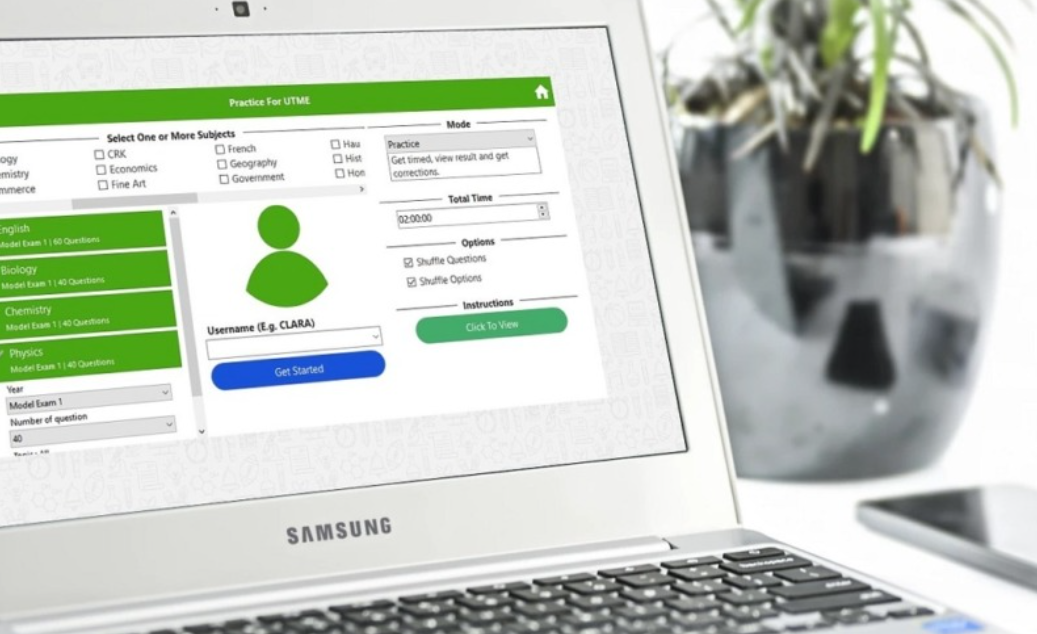
The most effective way to close this gap is practicing with a CBT-style simulation well before exam day, rather than relying entirely on printed past questions until the final stretch. A simulated environment that mimics the actual on-screen layout, timing, and navigation tools gives candidates a chance to build the muscle memory for the format itself, separately from reviewing content.
It’s worth running at least a few full-length timed simulations in the weeks leading up to the exam, specifically to surface any interface-related habits that need adjusting — rather than discovering them for the first time on exam day, when there’s no room to adapt.
What to Expect on the Day Itself
Beyond the software interface, the physical testing environment differs from a typical classroom exam setting. Candidates are usually seated at individual computer stations, often in a room with other candidates working through different question sets or subjects simultaneously, which can be a distraction for anyone who hasn’t experienced a shared testing hall before. Bringing earplugs, where permitted, or simply mentally preparing for a busier environment than a quiet exam hall, helps reduce the adjustment period once the actual test begins.
Technical issues, while relatively rare, do occasionally happen — a frozen screen, a login delay — and candidates should know the basic process for flagging an issue to an invigilator rather than panicking or attempting to fix it independently, which can sometimes make a minor glitch worse.
Resources for Staying Current on Format Changes
JAMB has adjusted its CBT process periodically since its introduction, and staying current on any procedural changes ahead of a given exam cycle is worth the small time investment — a resource like www.testinsider.com tracks exam format details across multiple standardized tests and can be a useful reference point for confirming current procedures rather than relying on outdated information from a previous year’s cycle.
Preparation That Covers Both Halves of the Exam
Scoring well on JAMB isn’t only a function of subject knowledge — it’s subject knowledge combined with comfort in the specific format the exam is delivered through. Candidates who treat format familiarity as a separate, deliberate part of their preparation, rather than an afterthought handled the morning of the exam, tend to perform closer to their actual ability level than those who show up well-prepared on content but unfamiliar with the system itself.