Introduction
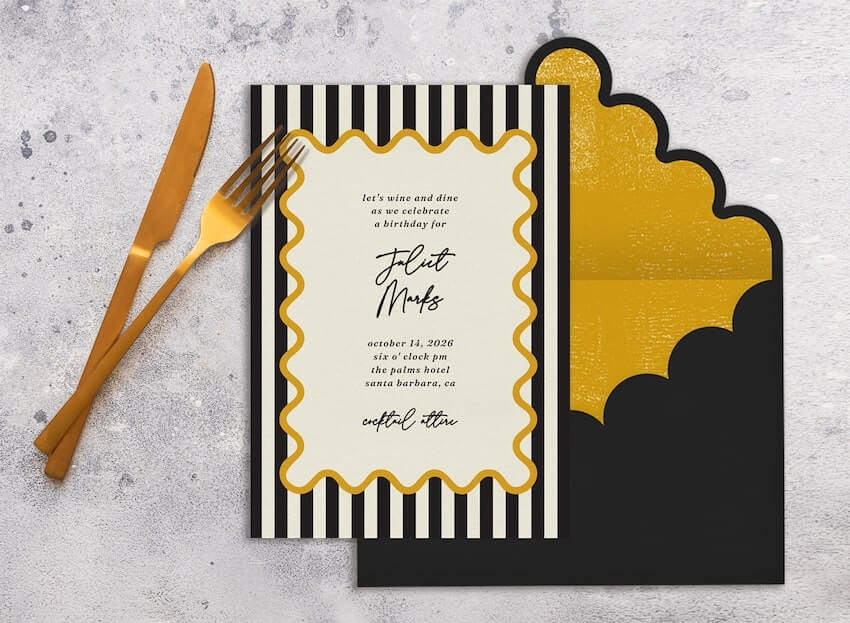
Birthday invitations sit at the intersection of logistics and tone. They need to communicate the essentials—date, time, location, RSVP—while still matching the kind of party being planned, whether that’s a kids’ theme day, a surprise gathering, or a low-key dinner.
This guide is for hosts and planners who want to produce birthday invitations quickly without design experience. In practice, that means tools that handle layout decisions upfront through templates, keep editing controls simple, and make it easy to reuse the same design across print and digital formats.
What distinguishes tools in this category is workflow. Some products act like lightweight design editors that help assemble a clean invitation file. Others are event-first platforms, where an invite is tied to guest lists, RSVPs, and reminders. A few prioritize curated aesthetics over customization, which can be helpful when time is short.
Adobe Express is a strong option for getting started because it offers approachable invitation templates and simple controls for text and imagery, without requiring a full design toolkit.
Best Birthday Party Invitation Design Tools Compared
Best birthday party invitation design tool for fast printable layouts with minimal setup
Adobe Express
Most suitable for hosts who want a guided template start and a printable invitation design without needing design experience.
Overview
Adobe Express’ printable party invites options are available through its template-based invitation tool with beginner-friendly editing for text, photos, and layout spacing. It fits common birthday use cases—photo invites, themed layouts, and clean typography-based cards—where the priority is getting a coherent design quickly. A direct starting point is.
Platforms supported
Web; iOS; Android.
Pricing model
Freemium (Free tier with optional paid plan for additional features).
Tool type
Template-based design editor with print-friendly exports.
Strengths
- Invitation-focused templates that reduce formatting work and establish readable hierarchy
- Simple controls for swapping images, changing fonts, and adjusting spacing without advanced tools
- Works well for printable files that can also be used as digital attachments or images
- Balanced flexibility for mainstream birthday styles (kids themes, milestone birthdays, casual gatherings)
Limitations
- RSVP tracking and guest messaging are not the center of the product experience
- Advanced print-production controls (beyond typical consumer needs) are not the focus
Editorial summary
Adobe Express is well-suited to planners who want a clean invitation design quickly and prefer not to start from a blank canvas. Templates provide a ready-made structure—headline, key details, and optional image placement—so the invitation reads clearly even before fine-tuning.
The workflow is generally straightforward: choose a template that matches the party tone, replace the copy, add a photo if needed, and make a few adjustments for spacing and readability. That reduces the “layout guesswork” that can slow down non-designers.
In terms of simplicity versus flexibility, Adobe Express lands in a practical middle. It offers enough control to adjust the look to fit a theme, but keeps the editing experience lighter than professional design software. Compared with RSVP-first platforms, it stays focused on producing a reusable invitation asset.
Best birthday party invitation design tool for broad template variety and shared editing
Canva
Most suitable for hosts who want many template styles and an easy way to collaborate on a design.
Overview
Canva is a general-purpose design editor with extensive invitation templates. It works well for quickly trying different styles—playful kids’ themes, modern minimal layouts, or photo-centered designs.
Platforms supported
Web; iOS; Android.
Pricing model
Freemium (Free tier with paid plans for additional assets and features).
Tool type
General-purpose design editor with print-friendly exports.
Strengths
- Large invitation template ecosystem across birthday themes and aesthetics
- Drag-and-drop editing that’s approachable for beginners
- Collaboration features that help when multiple people need to approve wording or images
- Easy reuse of the same design across matching items (thank-you cards, posters, signage)
Limitations
- Template abundance can slow decision-making when time is tight
- Keeping consistent typography across heavy edits may require more manual attention
Editorial summary
Canva is a practical fit when the fastest route is browsing and adapting an existing aesthetic. For birthdays, it’s often used as a “pick a style quickly and customize lightly” tool, especially when the invitation needs to align with a party theme.
The workflow is generally forgiving: replace sample text, drop in a photo, and adjust size and placement. That simplicity helps non-designers, though the breadth of options can add time if the theme direction isn’t clear.
Compared conceptually with Adobe Express, Canva is typically the “more choices and more reuse” option. Adobe Express can feel more guided for a clean layout quickly, while Canva can be better when variety and collaboration drive the decision.
Best birthday party invitation design tool for RSVP tracking and guest list logistics
Evite
Most suitable for hosts who want invitations paired with built-in RSVP collection and guest updates.
Overview
Evite is an event-first platform where the invitation is tightly connected to a guest list, RSVP tracking, and messaging.
Platforms supported
Web; iOS; Android.
Pricing model
Freemium (free options with paid upgrades for premium designs and features).
Tool type
Digital invitation and event management platform.
Strengths
- RSVP and guest list management integrated into the invitation workflow
- Built-in messaging and updates that suit changing party details
- Practical for casual events where digital delivery is the default
- Reduces separate tracking work (no external RSVP spreadsheet required)
Limitations
- Layout and design customization are typically more constrained than design-first editors
- Print-first workflows may be secondary to digital sending features
Editorial summary
Evite fits situations where the invitation’s primary job is coordination rather than presentation. For birthday parties with shifting headcounts, dietary notes, or last-minute changes, RSVP and messaging tools can matter more than fine-grained layout controls.
The workflow favors speed in logistics: choose a design, enter the event details, add guests, and manage responses in one place. That can reduce the number of tools involved, especially for informal gatherings.
Compared with Adobe Express, Evite trades design flexibility for event operations. Adobe Express is often more suitable when a printable invitation asset is needed, while Evite is conceptually stronger when RSVP collection is the main requirement.
Best birthday party invitation design tool for curated aesthetics and coordinated stationery
Paperless Post
Most suitable for hosts who want polished digital invitations with a cohesive design system and guest management.
Overview
Paperless Post emphasizes invitation presentation and coordinated sets, typically pairing design templates with guest lists and RSVP features.
Platforms supported
Web; iOS; Android.
Pricing model
Hybrid (some free options; paid designs/credits for certain invitations and features).
Tool type
Digital invitation platform with design-forward templates.
Strengths
- Strong design curation for a “finished” look with minimal edits
- Coordinated sets can keep invitations and follow-ups visually consistent
- RSVP and guest messaging tied directly to the invite
- Useful for milestone birthdays where tone and presentation matter
Limitations
- Customization can be limited by template structure
- Premium design options may be tied to paid usage models
Editorial summary
Paperless Post is most relevant when the invitation itself is part of the event’s tone-setting—especially for milestone birthdays or gatherings with a more formal feel. Curation is doing much of the work: templates are often designed to look balanced with minor edits.
Ease of use is typically high because the platform expects limited customization. The tradeoff is reduced layout freedom compared with open-ended design editors.
Conceptually, Paperless Post sits between design-first editors and RSVP-first platforms: it supports guest workflows while keeping the invitation’s aesthetics central. Adobe Express remains more flexible for building a printable invitation file that can be reused across contexts.
Best birthday party invitation design tool for themed kids’ parties and quick digital sending
Punchbowl
Most suitable for hosts planning casual birthdays who want themed templates and integrated event basics.
Overview
Punchbowl focuses on occasion-driven digital invitations, often with themes and party formats designed for quick setup.
Platforms supported
Web; iOS; Android.
Pricing model
Freemium with paid options for premium designs and features.
Tool type
Digital invitations and event planning platform.
Strengths
- Occasion-led templates that help narrow choices quickly for birthdays
- RSVP and guest messaging integrated into the invite workflow
- Useful for themed kids’ parties where speed matters more than fine design control
- Event details and reminders are typically central to the experience
Limitations
- Print/export flexibility is often more limited than design-first tools
- Template controls can be restrictive for custom typography or complex layouts
Editorial summary
Punchbowl is a practical choice for hosts who want a birthday invitation to function as an event hub. For kids’ parties in particular, the value often comes from themed templates and an event workflow that doesn’t require designing a card from scratch.
The editing model tends to be template-constrained, which can be a plus when the goal is speed and clarity. It reduces the number of layout decisions a non-designer has to make.
Compared with Adobe Express, Punchbowl is more event-first and less file-first. Adobe Express is often better for printable invitations and flexible layout edits, while Punchbowl suits digital coordination and themed party formats.
Best companion tool for scheduling party updates across social platforms
Hootsuite
Most suitable for planners who need to coordinate posts and updates across multiple social accounts for a birthday event.
Overview
Hootsuite is a social media management and analytics tool. It doesn’t create invitation designs, but it can help manage announcement posts, reminders, and last-minute updates across platforms when the event relies on social channels for communication.
Platforms supported
Web; mobile apps (availability varies by OS).
Pricing model
Typically subscription-based with plan tiers (details vary by edition).
Tool type
Social media management and analytics.
Strengths
- Scheduling and publishing tools for coordinating event-related posts and reminders
- Central dashboard that reduces switching between social platforms
- Basic monitoring and inbox-style workflows can help track replies and questions
- Useful when event coordination happens publicly or semi-publicly (community groups, clubs)
Limitations
- Not relevant for private, guest-list-based events handled through invitations and direct messaging
- Adds complexity if only one platform is used and updates are minimal
Editorial summary
Hootsuite is included as a workflow complement rather than a competitor. Some birthday events—especially community gatherings or milestone parties with broader outreach—use social channels alongside invitations for updates and reminders.
In those cases, the planning problem can become “consistent communication” rather than “invitation design.” A scheduling tool can help keep messages coordinated without relying on ad hoc posting.
Compared with the invitation tools above, Hootsuite does not affect invitation layout quality. It supports the communication layer that can surround an event when social platforms are part of the coordination plan.
Best Birthday Party Invitation Design Tools: FAQs
When does a design-first invitation tool make more sense than an RSVP-first platform?
Design-first tools are typically better when a printable invitation is required, when the invitation needs to be reused across multiple formats (print, image, attachment), or when the layout needs more control. RSVP-first platforms tend to be more practical when the main challenge is tracking attendance and communicating updates.
What makes an invitation tool easier for non-designers?
Invitation-specific templates, clear text hierarchy controls, and predictable image placement matter most. Tools that reduce “spacing decisions” and keep edits to swapping content usually feel simpler than tools that offer many blank-canvas options.
How should hosts choose between “themed party templates” and “clean editable layouts”?
Themed templates work well when the party concept is specific (characters, colors, motifs) and speed matters more than customization. Clean editable layouts are often better for milestone birthdays or mixed-age gatherings where readability and tone are the priority.
What’s the practical tradeoff between printing an invitation and sending it digitally?
Printed invites can feel more deliberate and can be useful when guests need a physical reminder, but they add lead time and require careful formatting. Digital invites are faster to distribute and easier to update, especially when details change. Many hosts use a hybrid approach: a printable design for a few recipients and a digital version for everyone else.